For SolidWorks drawing offices

From SolidWorks assembly to sorted, stamped, nest‑ready drawings in minutes.

DraftX automates the slow, error-prone work between design release and the shop floor — validated job packs, batch PDF & DXF export, AI drawing sorting, QC reporting and Lantek-ready nesting.

Runs on your machines. Your drawings never leave your network.
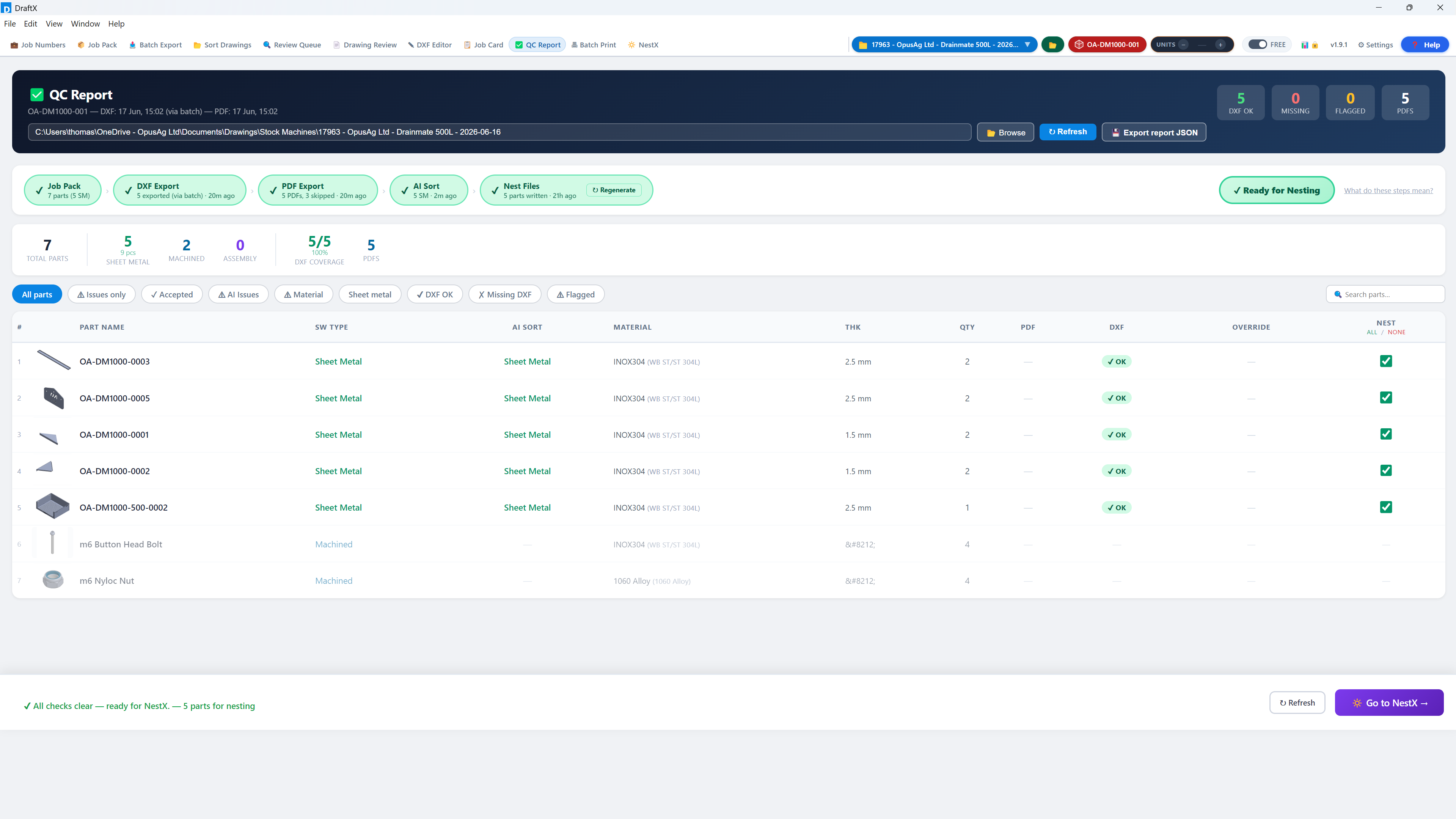
DraftX QC Report — every pipeline gate green, part-by-part DXF coverage, ready for nesting
£24.3k
labour saved, measured in-app
405 hrs
of drawing-office time given back
50.7
working days saved
28.9k
parts processed automatically
Real figures from DraftX Analytics in production at a UK steel fabrication company — tracked live, per job, per user, per week.
How it works

One guided pipeline, four steps

DraftX walks every user through the same proven workflow — new starters can't take a wrong turn.

1

Job Pack

Point DraftX at your SolidWorks assembly. It scans every part, validates parameters and flags missing data before anything is exported.

2

Batch Export

Every drawing exported to PDF and every flat pattern to DXF in one run — named, stamped and filed to your conventions.

3

AI Sort

Drawings are classified by operation — laser, folding, fabrication, bought-out — with a review queue for anything uncertain.

4

Release

QC gates confirm the job is complete, job cards print, and nest-ready DXFs flow to Lantek with NestX.

Every step is tracked, so Analytics shows exactly how many hours and pounds DraftX saves you.
The numbers

Your MD's favourite tab

DraftX measures itself. Every export, sort, stamp and print is logged against a time-study benchmark, so the Analytics dashboard shows exactly what the software is worth — in hours and in pounds, at your hourly rate.

  • Money, hours and working days saved — headline KPIs
  • Per-operation breakdown: what saves the most
  • Per-user and per-week trends
  • Benchmarks you can tune to your own shop
DraftX Analytics — £24.3k and 405 hours saved
Analytics — real production data, not projections
Features

Everything between design and the shop floor

📦

Job Pack validation

Scans the full assembly, checks part parameters per company conventions and produces a part-by-part readiness report before export.

📤

Batch PDF & DXF export

One click exports every drawing and flat pattern in the job — consistently named, stamped with units and filed automatically.

🤖

AI drawing sorting

Classifies drawings by manufacturing operation with your own categories. Uncertain calls go to a visual review queue, never silently wrong.

Built-in DXF editor

CAD-grade snapping, measuring and editing for quick flat-pattern fixes — with hand-edits protected from being overwritten by re-exports.

QC gates

A pipeline checklist proves every job pack ran, every file exported and every drawing sorted — before anything reaches the shop floor.

🔆

NestX Add-on

Prepares nest-ready jobs for Lantek directly from sorted DXFs — material, thickness and quantities included.

📋

Job cards & batch print

Auto-generated job cards and one-click batch printing of full drawing sets, grouped by operation.

📊

Savings analytics

Hours and pounds saved per job, per user and per week — the ROI report your MD wants, generated automatically.

🧭

Guided mode

Tabs unlock as each workflow step completes, with a clear "next step" prompt — new users are productive on day one.
Free trial

Try DraftX on your own jobs

Full access for your team, on your drawings, with your conventions. No card, no commitment — and your data stays exactly where it is if you decide not to continue.

  • Every feature unlocked, including NestX
  • Installed on your machines — nothing uploaded
  • We help you set up your first job pack
  • Live countdown in-app, no surprise cut-off
30
days, full access
Request a trial key
For your IT team

On-premise by design

Your data stays put

DraftX runs locally against your SolidWorks installation and network folders. Drawings, models and job data never leave your network.

Minimal footprint

Windows desktop app. Requires SolidWorks on the machine for export features. No server to host, no database to manage.

Simple licensing

Machine-bound keys validated against our license service over HTTPS — the only outbound connection — with a 72-hour offline grace period.

⬇ Download DraftX for Windows
Always the latest version. Installs in minutes — you'll need a license or trial key to activate. New here? Follow the quick start guide.
Get started

See it on your own drawings

A 15-minute screen share is all it takes. Bring a recent job — we'll show you what DraftX would have done with it.

Book a demo — sales@opusag.co.uk
Or request a 30-day trial key in the same email.