For SolidWorks drawing offices

From SolidWorks assembly to sorted, stamped, nest‑ready drawings in minutes.

DraftX automates the slow, error-prone work between design release and the shop floor — validated job packs, batch PDF & DXF export, AI drawing sorting, QC reporting and Lantek-ready nesting.

30-day trial built in — no key, no card. Install, click Start free trial, and the guided tour does the rest. Runs on your machines; your drawings never leave your network.
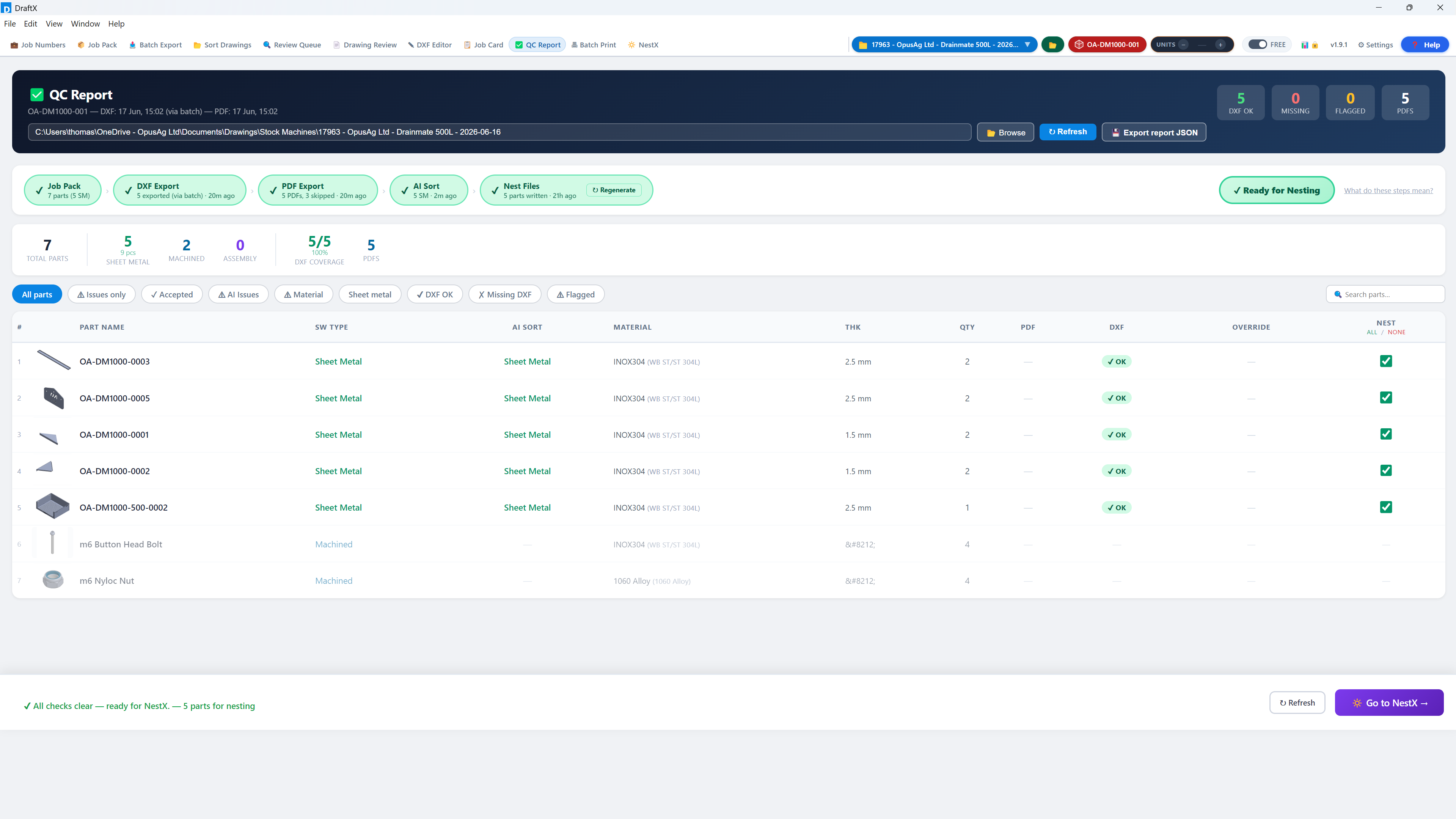
DraftX QC Report — every pipeline gate green, part-by-part DXF coverage, ready for nesting
How it works

One guided pipeline, four steps

DraftX walks every user through the same proven workflow — new starters can't take a wrong turn.

1

Job Pack

Point DraftX at your SolidWorks assembly. It scans every part, validates parameters and flags missing data before anything is exported.

2

Batch Export

Every drawing exported to PDF and every flat pattern to DXF in one run — named, stamped and filed to your conventions.

3

AI Sort

Drawings are classified by operation — laser, folding, fabrication, bought-out — with a review queue for anything uncertain.

4

Release

QC gates confirm the job is complete, job cards print, and nest-ready DXFs flow to Lantek with NestX.

Every step is tracked, so Analytics shows exactly how many hours and pounds DraftX saves you.
The numbers

Your MD's favourite tab

DraftX measures itself. Every export, sort, stamp and print is logged against a time-study benchmark, so the Analytics dashboard shows exactly what the software is worth — in hours and in pounds, at your hourly rate.

  • Money, hours and working days saved — headline KPIs
  • Per-operation breakdown: what saves the most
  • Per-user and per-week trends
  • Benchmarks you can tune to your own shop
DraftX Analytics — hours and pounds saved
Analytics — real production data, not projections
Features

Everything between design and the shop floor

📦

Job Pack validation

Scans the full assembly, checks part parameters per company conventions and produces a part-by-part readiness report before export.

📤

Batch PDF & DXF export

One click exports every drawing and flat pattern in the job — consistently named, stamped with units and filed automatically.

🤖

AI drawing sorting

Classifies drawings by manufacturing operation with your own categories. Uncertain calls go to a visual review queue, never silently wrong.

Built-in DXF editor

CAD-grade snapping, measuring and editing for quick flat-pattern fixes — with hand-edits protected from being overwritten by re-exports.

QC gates

A pipeline checklist proves every job pack ran, every file exported and every drawing sorted — before anything reaches the shop floor.

🔆

NestX Add-on

Prepares nest-ready jobs for Lantek directly from sorted DXFs — material, thickness and quantities included.

📋

Job cards & batch print

Auto-generated job cards and one-click batch printing of full drawing sets, grouped by operation.

📊

Savings analytics

Hours and pounds saved per job, per user and per week — the ROI report your MD wants, generated automatically.

🧭

Guided mode

Tabs unlock as each workflow step completes, with a clear "next step" prompt — new users are productive on day one.
Free trial

Try DraftX on your own jobs

Download, install, and click Start free trial — no key to request, no card, no sales call. Full access on your drawings, with your conventions, and your data stays exactly where it is if you decide not to continue.

  • Every core feature unlocked — NestX add-on demo on request
  • Installed on your machines — nothing uploaded
  • Guided tour walks you through your first job
  • Live countdown in-app, no surprise cut-off
30
days, full access
Download DraftX free
When you're ready to continue, upgrading takes one click from inside the app.
For your IT team

On-premise by design

Your data stays put

DraftX runs locally against your SolidWorks installation and network folders. Drawings, models and job data never leave your network.

Minimal footprint

Windows desktop app. Requires SolidWorks on the machine for export features. No server to host, no database to manage.

Simple licensing

Machine-bound keys, validated over a single encrypted connection — with a short offline grace period so travel or a network blip never stops work mid-job.

Download DraftX for Windows
Always the latest version. Installs in minutes — you'll need a license or trial key to activate. New here? Follow the quick start guide.
Get started

See it on your own drawings

Download DraftX, click Start free trial, and run a recent job through it — the guided tour walks you through every step. Prefer a walkthrough first? We're happy to show you.

Download DraftX free
No key to request — the 30-day trial is built into the app. Licensed per PC, per year.